
What AI coding actually costs — per developer, repo, and PR.
PromptConduit is an open-source CLI that tracks token usage, cost, prompts, and tool calls for Claude Code, Cursor, Gemini CLI, Codex, Copilot, and Grok Build. Events land in a local JSONL file first. You can read every byte before anything leaves your machine. Teams sync to see spend across every tool, no enterprise contract needed. And you never have to open a dashboard: ask your agent, and the built-in MCP server answers.
curl -fsSL https://promptconduit.dev/install | bash {
"schema": 2, ①
"tool": "claude-code",
"hook_event": "Stop",
"captured_at": "2026-07-03T21:16:54Z",
"enrichments": {
"vcs": { "repo": "acme/platform", "branch": "feat/billing",
"dirty": true }, ②
"turn": { "duration_ms": 187954 },
"diff": { "files_changed": 3, "insertions": 148,
"deletions": 27 }, ③
"cost": { "totals": { "usd": 1.0716,
"tokens": { "output": 11628,
"cache_read": 777374 } },
"signals": { "cache_hit_rate": 0.91 } } ④
}
}- ① One JSON line per hook event, written to disk before any network call. No account required for any of it.
- ② Branch and repo names — never your diff contents.
- ③ What the turn changed, as counts.
- ④ What the turn cost, priced locally from your own transcript.
What one captured event looks like
captures_from
how_it_works
Three commands, then forget it's there.
1. Install hooks
promptconduit init signs you in (or stays local-only),
detects Claude Code, Cursor, Gemini CLI, Codex, Copilot, and Grok Build, and wires the CLI into each assistant's hook
system. Nothing about how the tool behaves changes.
2. Work as usual
Every session appends structured events to
~/.promptconduit/events.jsonl — enriched with git
context, timing, tool outcomes, and exact cost. Secrets are
scrubbed on the way in.
3. Ask it questions
Ask your agent “what has this session cost?” and the
MCP server that install registers answers it.
Or run promptconduit cost, or open the
editor extension for live cost and
coaching, fully offline.
ask_your_agent
Don't open a dashboard. Ask your agent.
promptconduit install registers an MCP server with Claude Code,
Cursor, and Gemini CLI. Your agent then answers cost questions with live
numbers: what this session cost, what the team spent, which budget is about
to run over. It can also set a budget or tag a repo with its client, and it
asks you first. The local tools need no account. Team tools use your
sign-in.
> How is the team tracking against its AI budgets,
  and which repo costs the most?

⏺ promptconduit · team_budgets
⏺ promptconduit · team_spend (period: 30d)

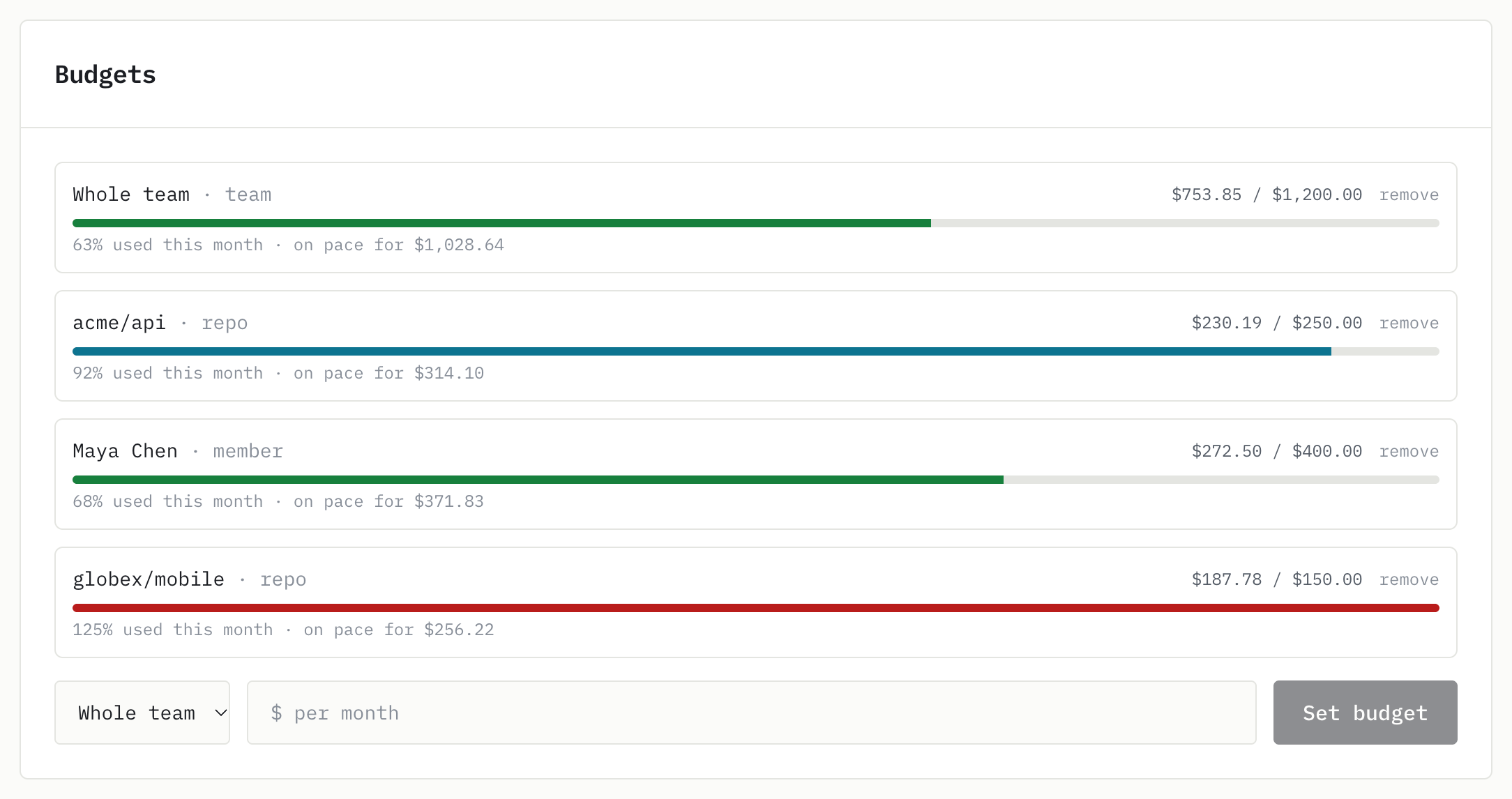
  Whole team     $754 of $1,200   63%  on track
  acme/api       $230 of $250     92%  projected $255, will go over
  globex/mobile  $188 of $150    125%  already over

  Costliest repo: acme/api, $230 across 26 sessions.
- Free, on your machine.
session_cost,cost_history, andrecent_sessionsread only local files. Nothing is sent. - Your team's numbers. Spend by member, repo, client, model, and PR, the savings report, budgets, and CSV export.
- Writes ask first. Setting a budget, tagging a client, or inviting someone is marked as a change, so the agent confirms before it acts.
- Slash commands too.
spend_reviewandbudget_checkturn into one-line prompts. - Or from any terminal.
promptconduit team spend --jsondoes the same for scripts and CI.
in_your_editor
Or watch it live, in your editor.
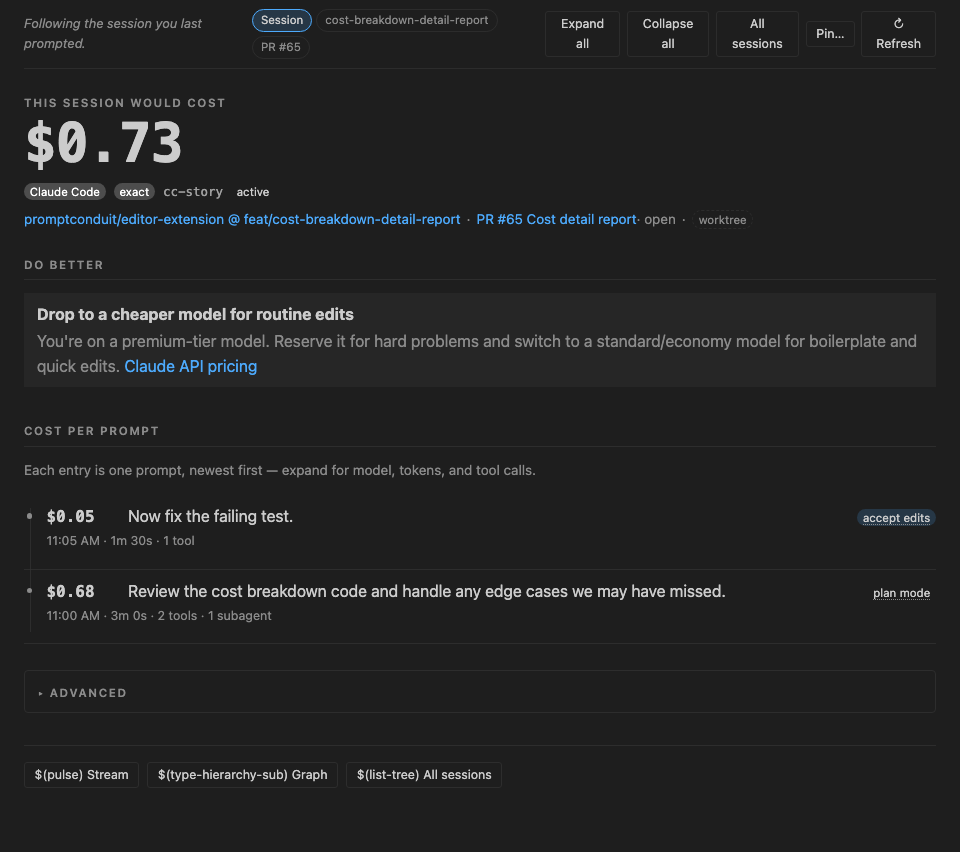
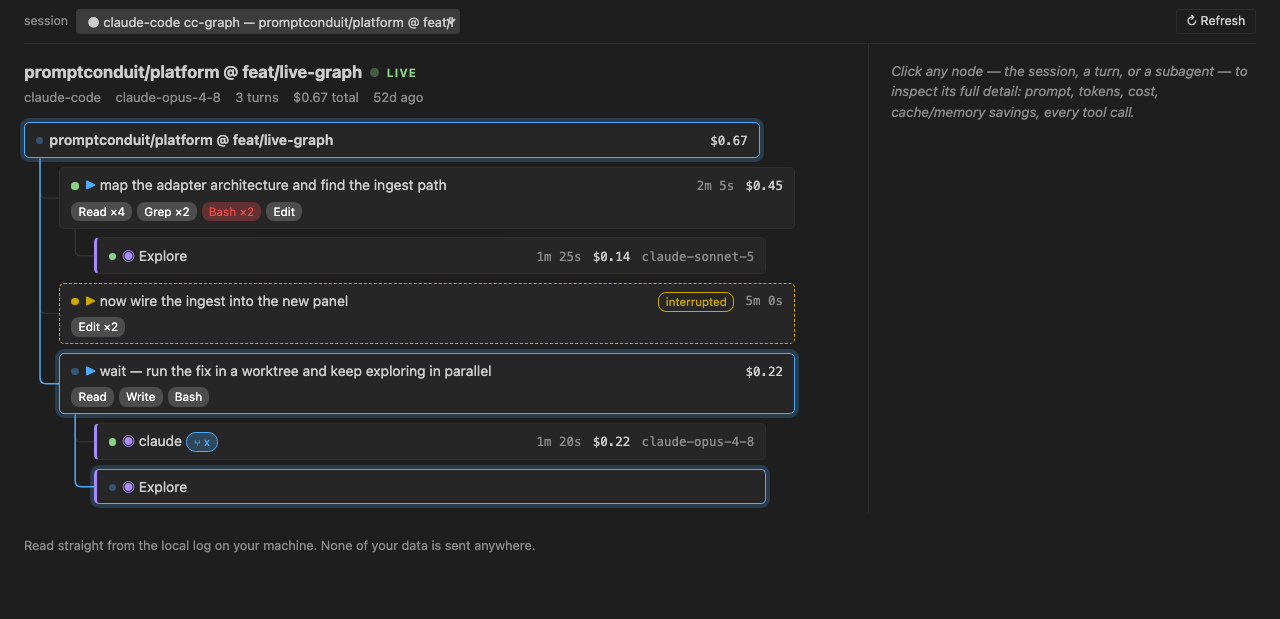
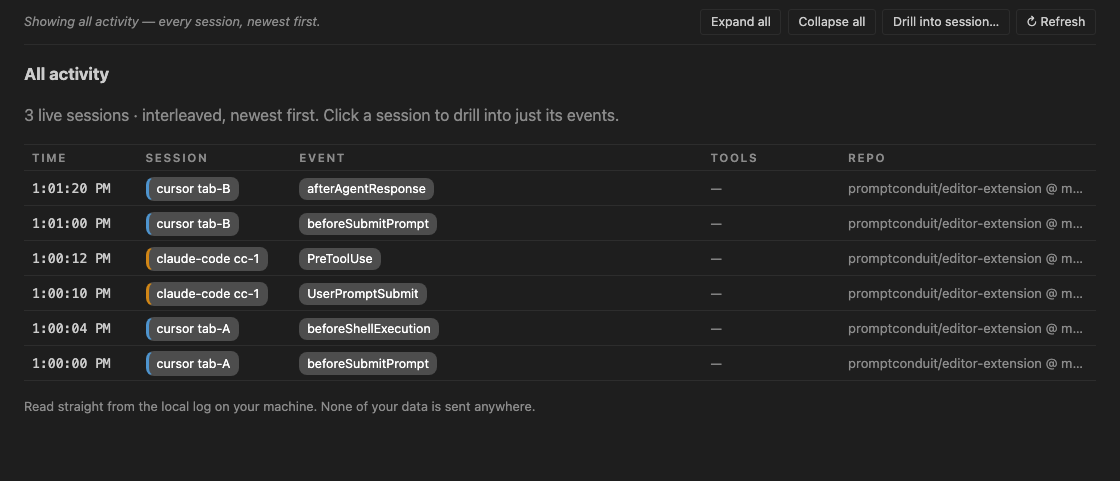
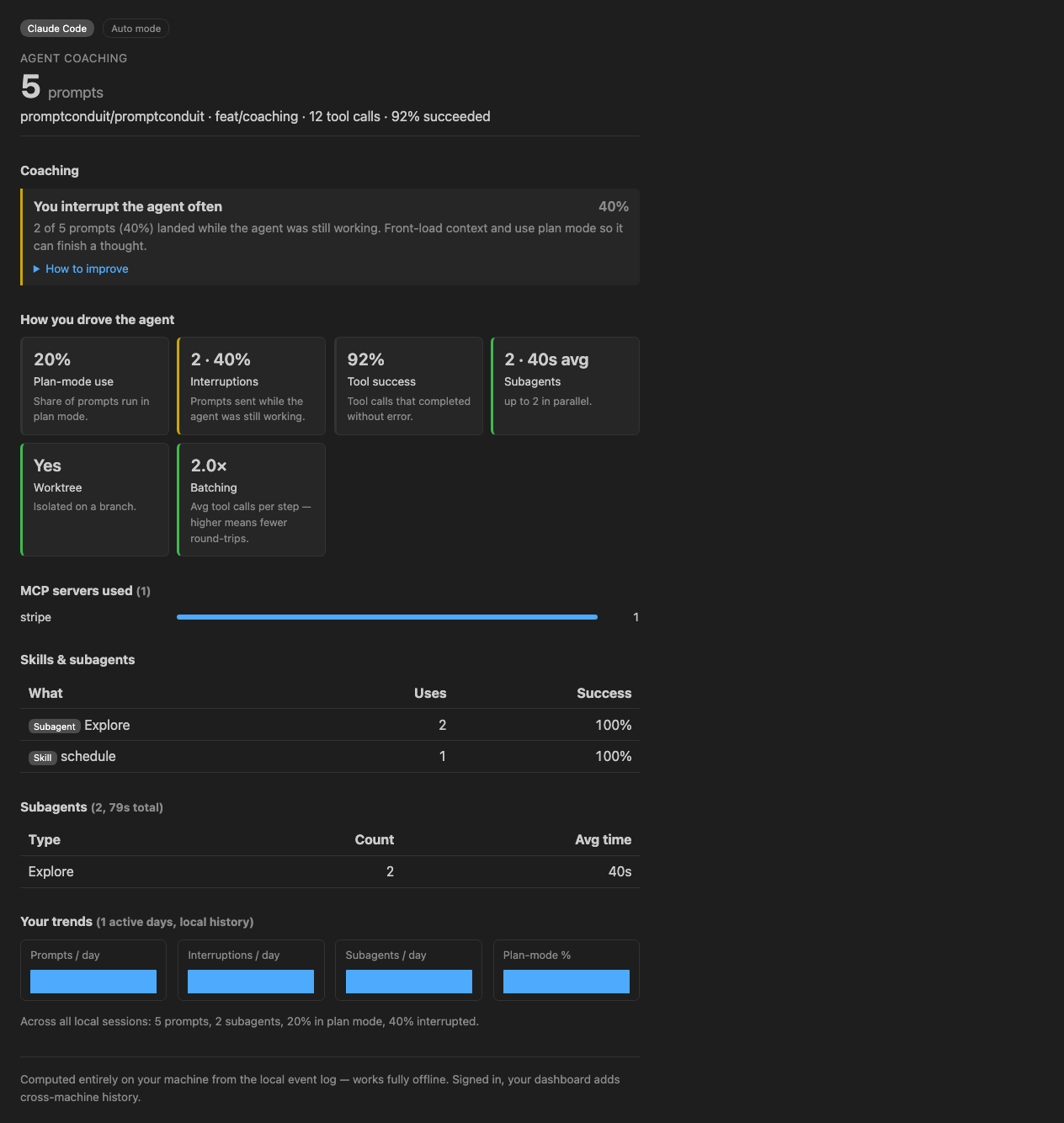
The free editor extension renders the same local
events in the editor — a per-prompt cost ledger, a live Session Graph of your
agents, a raw event stream, and an offline coaching report. Fully offline,
for Claude Code and Cursor. promptconduit graph is the
same Session Graph in any browser.
enrichments
Names and numbers, on the record.
Each event carries enrichment slugs computed locally at capture time. They record that things happened and what they cost — not what you or the model said.
env- host, OS, architecture, working directory
trace- W3C trace and span IDs linking every event in a session
vcs- repo, branch, commit, dirty counts, linked pull request
prompt- length, word count, interrupt detection — counts, not contents
cost- per-request tokens and USD, cache-hit rate, model tier
tools- tool call names, durations, failures, MCP server, skill
diff- files changed, insertions, deletions per turn
subagent- agent type, parallelism, duration, spend
turn- wall clock from prompt submit to Stop
permission- what was requested, what was denied
local_only
Local first is not a mode. It's the default.
The CLI works with no account and no API key — that's the whole free
tier, forever, MIT licensed. Sending anything anywhere requires you to
opt in, and local_only: true makes opting in impossible.
When you do connect a team, you can diff exactly what leaves the
machine, because it's the same file you've been reading all along.
teams
The bill comes per tool. The questions come per repo.
Your team runs Claude Code, Cursor, and whatever shipped last month, each billed on its own. Vendor dashboards stop at their own tool, and their telemetry exports are usually an enterprise-plan feature. Connect a team and every member's sessions roll up into one view of what AI coding costs and where it goes.
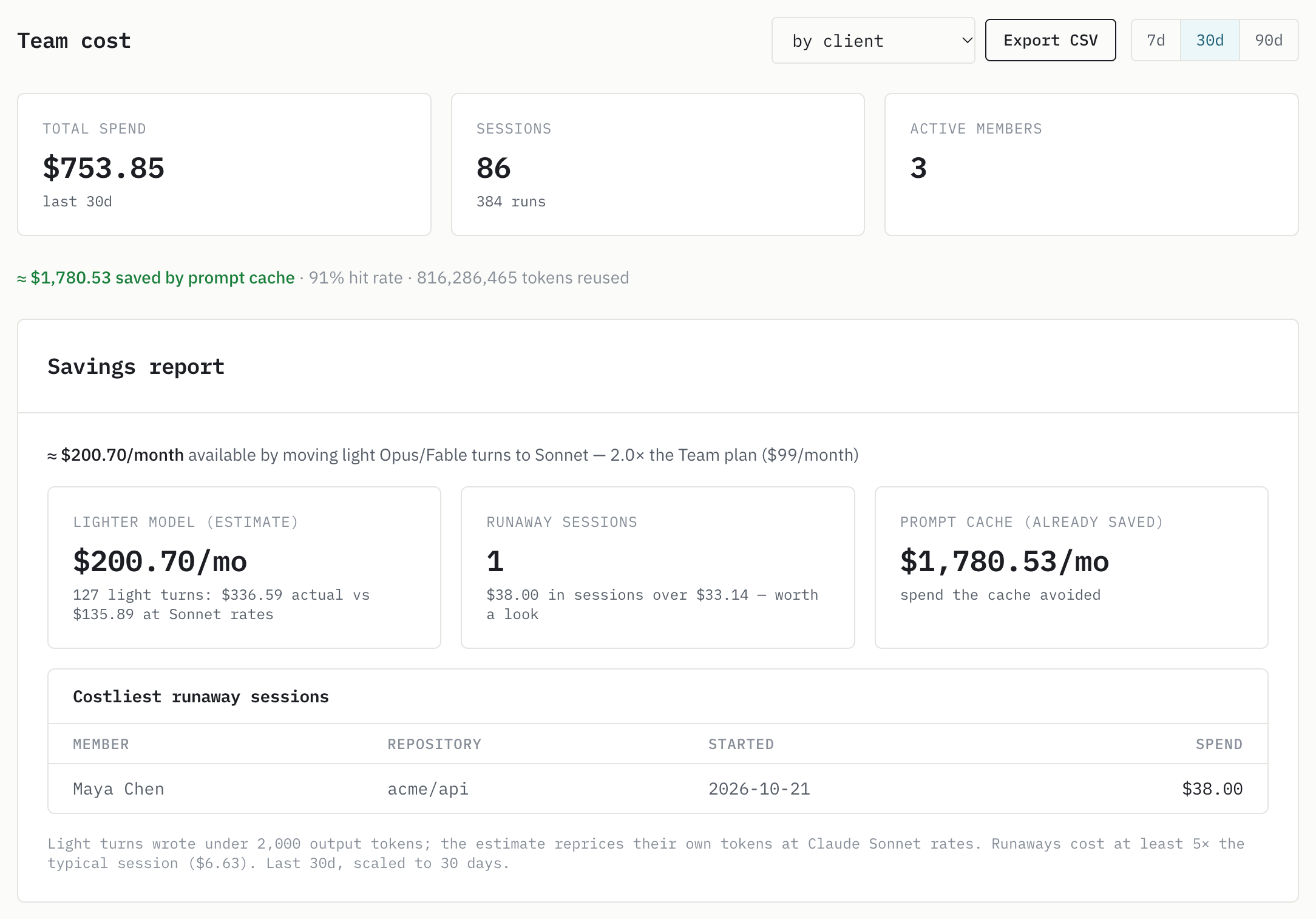
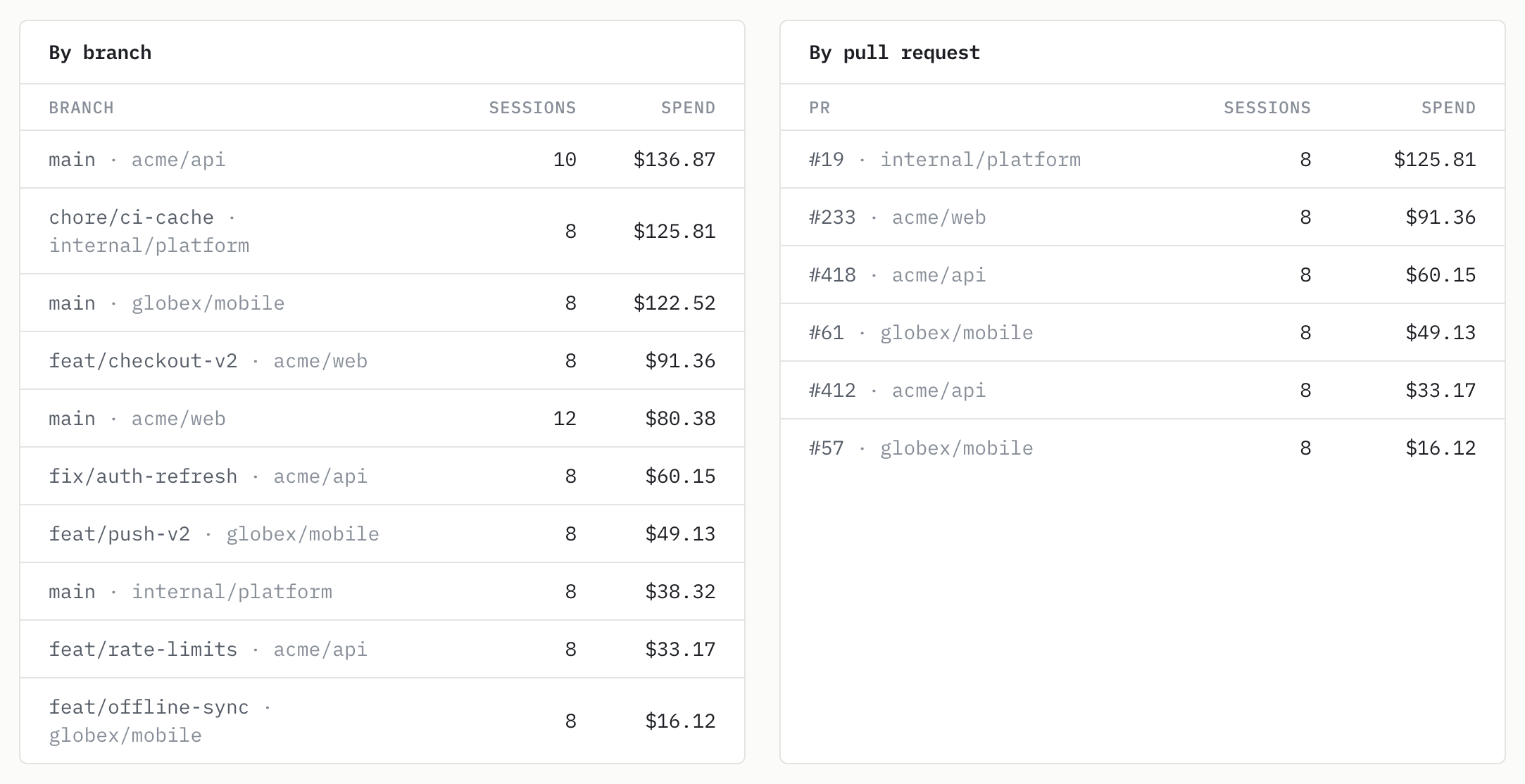
- Spend by member, model, repo, branch, and PR. The breakdown whoever pays for the tokens keeps asking for.
- Claude Code with nothing to install. Point Claude Code's built-in telemetry at PromptConduit. Six settings
- Every tool in one view. Claude Code, Cursor, Codex, Gemini CLI, Copilot, and Grok Build, captured by the same CLI.
- Per client, for agencies. The repo view is spend per client: re-bill it or price the next fixed bid. How agencies use it
- Budgets with alerts. A monthly budget for the team, a repo, or a member, with an alert at 80% and 100% by email and in Slack.
- On the pull request. GitHub PR comments show the AI spend behind each change.
- In your agent, not just a browser. Every number here is one question away in Claude Code, Cursor, or Gemini CLI. MCP server
field_notes
Guides to what the numbers mean.
From the blog
- How to Check Claude Code Token Usage and Cost
How to see and check Claude Code token usage, plan limits, and session cost with /usage (/cost, /stats), a status line, /context, ccusage, the Console, and PromptConduit.
- Claude Code OpenTelemetry: Track Cost per Developer and Repo
Use Claude Code's built-in OpenTelemetry export to track cost per developer and repository. The settings, the api_request event fields, the gotchas (no default protocol, repo attributes off by default), and where to send it.
- Cursor Expense Tracker for Teams: Spend per Developer, Repo, and Client
Track what your team spends on Cursor per developer, repository, pull request, and client. What Cursor's team dashboard covers, what it leaves out, and how to fill the gap with budgets and alerts.
Coaching guides
- Adopt skills and slash-commands
Capture repeatable work as skills instead of retyping long prompts.
- Batch your tool calls
Grouping independent reads and edits cuts round-trips and output tokens.
- Delegate with subagents
Parallel agents cover more ground and keep your main context clean.
$ curl -fsSL https://promptconduit.dev/install | bash
$ promptconduit init
✓ hooks installed — capturing to ~/.promptconduit/events.jsonl